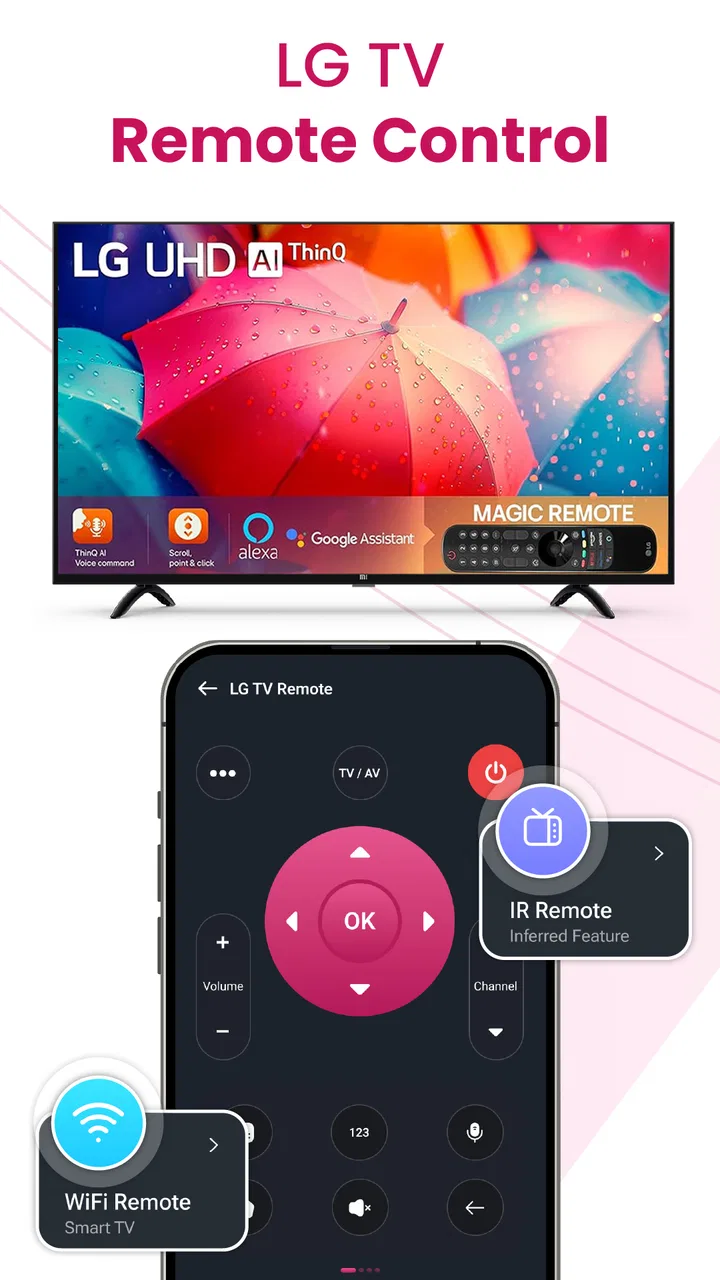
LG TV Remote Control app
- 3.5
- Rating
- 100.00K
- Installs
- Free
- Price
 Analysis by App-foxy
Replacing a misplaced LG remote sounds like a small problem until you are sitting in front of the television with no practical way to change the input, adjust the volume, or start the program you want. I reviewed LG TV Remote Control with that everyday situation in mind. It is a free House & Home app from FutureAppsTechnology, built around the simple idea of turning an Android phone into a remote for an LG TV and other infrared devices.
The most important capability here is not a long feature list. It is the convenience of having a remote control available on a device that is usually already in your hand. That changes the experience most when the original remote is temporarily lost, damaged, or being used by somebody else. The app is aimed at practical control rather than entertainment, and I found that its value depends heavily on whether your phone and television can communicate in the way the app expects.
Why phone-based LG TV control can be useful
The central appeal is immediate access. A physical remote can disappear under a sofa, remain in another room, or run out of power at exactly the wrong moment. A phone-based controller gives you another route to the basic actions you use most often: waking the television, changing channels, managing sound, and navigating the on-screen interface.
You May Also Like

 Blood Strike: 2.5 Anniversary
Blood Strike’s Loadouts Turn Every Drop Into a Tactical Gamble
A close look at Blood Strike’s custom loadouts: how fast access to signature weapons reshapes its battle royale rhythm, rewards preparation, and narrows the gap between fights.

 Pandora - Music & Podcasts
Pandora’s Music Is Easy to Start, but Harder to Recover
Pandora’s strength is its low-effort path from a seed to a station. Its weak spot is how much confidence it asks you to place in connection, setup, and quiet recovery.

 8 Ball Pool
 Is Built on Rivalries, Rematches, and Routine
A close look at the rivalries, rematches, shared routines, and unanswered safety questions that turn a quick pool match into a persistent mobile community.

 Samsung Music
’s Quiet Strength Is Playing What You Already Own
Its reach comes less from spectacle than from dependable access to a personal library. That simplicity is both the app’s strongest retention engine and its ceiling.

 AccuWeather: Weather Radar
AccuWeather Review: A Quick, Clear Forecast for Everyday Decisions
For everyday plans, the best forecast is the one you can understand quickly. AccuWeather makes rain timing, radar, and local conditions easy to act on, with a few trade-offs.

 Hill Climb Racing
Why Hill Climb Racing Still Turns Crashes Into One More Run
A tiny car, a bumpy hill and one more upgrade: Hill Climb Racing keeps resurfacing because its simple chaos makes every near-miss feel personal.
More From Our News Desk
View All News


That sounds ordinary, but the difference becomes noticeable during shared use. If someone is watching television while you are holding the phone, you do not need to interrupt the room to search for the remote. In a home with children, guests, or several devices, a universal controller can also reduce the number of small remotes left on the coffee table.
The app’s store summary specifically presents it as a way to manage LG televisions and infrared devices. I would therefore view it as a convenience tool rather than a replacement for every advanced function of a manufacturer’s original accessory. The strongest reason to try it is quick access to everyday controls, not the expectation that a phone will perfectly reproduce every button and menu found on a premium physical remote.
There is also a useful psychological advantage: the phone is easier to locate than a thin black remote. I often know where my phone is even when I have no idea where the television remote went. That makes this kind of app particularly appealing in bedrooms, guest rooms, student accommodation, and family living rooms where remotes tend to migrate.
The capability that matters most
In my view, the key capability is the attempt to combine LG TV control with broader infrared-device control in one app. That matters when the television is connected to another appliance that also uses an infrared remote. Instead of keeping several controllers nearby, you can test whether the phone can handle the devices you use most.
The word “test” is important. Compatibility is not something I would assume simply because an app calls itself universal. Phones differ in hardware, and televisions differ in how they receive commands. If your phone lacks the necessary infrared hardware, or if your particular setup relies on a connection method the app does not support in the way you expect, the experience may be limited. I would check the practical compatibility of your phone and TV before treating the app as your only remote.
That limitation does not make the idea pointless. It simply means the app is best approached as a backup and convenience layer. If it works with your setup, it can be surprisingly useful. If it does not, the original remote or an official accessory remains the safer choice.
What using it feels like in practice
My first recommendation is to try the app while the original remote is still available. That may sound less urgent than downloading it after the remote disappears, but it gives you time to confirm whether the phone can control the television and whether the button arrangement feels comfortable. Testing beforehand also prevents the frustrating situation of discovering a compatibility problem when you are already relying on the app.
Once installed, I would treat the first session as a setup check rather than immediately putting the physical remote away. Open the controller, select the relevant device path, and try several commands instead of testing only the power button. Power, volume, navigation, input selection, and channel control are the actions that reveal whether the app is genuinely useful for your routine.
A power command working by itself is not enough. The real test is whether the app responds consistently when you move through menus or change sources. For example, if you regularly switch between live television and a streaming box, input control is more important than an occasional channel change. If you mainly use the TV for one service, volume and navigation may matter more.
I also suggest keeping the phone pointed toward the television when using infrared control. This is one of the less obvious trade-offs of turning a phone into a remote: the handset is convenient, but infrared communication generally depends on position and range. You may need to aim it more carefully than you would with a familiar physical remote, especially from a side angle or another seat.
Another practical tip is to keep the app available before you need it. A remote app is most valuable when it is already installed, tested, and easy to find. I would place it somewhere accessible on the phone rather than burying it in a folder. That small preparation makes a bigger difference than downloading it after the television is already on and the physical remote has vanished.
A realistic living-room scenario
Imagine a typical evening: the TV remote is missing, the television is already displaying the wrong input, and the streaming device is not responding to its own controller. With this app installed, I would first use the phone to regain basic control of the LG television, then select the required input, and finally adjust the sound from the same handset. The benefit is not that the phone becomes magical; it is that it removes the immediate need to search through drawers and cushions.
This workflow also shows why a universal label can be useful without being a guarantee. If the app can communicate with the television and the relevant infrared equipment, one phone may cover the most important steps. If the external device is incompatible, the app may still solve the TV portion of the problem, while you continue using the separate controller for the rest.
For shared households, I would use it as a secondary option rather than handing the phone around constantly. One person may need the handset for messages or calls, and a phone is easier to drop than a dedicated remote. The best arrangement is usually to keep the physical remote available and use the app when convenience, backup access, or a missing controller makes it worthwhile.
Where it compares well with ordinary alternatives
The usual alternative is the original LG remote. That remains the most predictable choice because it is designed for the television and normally places every familiar control in a stable layout. It also does not depend on your phone’s battery, screen, or compatibility. For frequent TV users who need specialist buttons, the original remote is likely to feel better.
A replacement universal physical remote is another option. It can control more than one appliance and is often easier to share with family members. Its disadvantage is that you must buy it, keep it nearby, and sometimes configure it manually. The app is more attractive when you want to avoid another piece of hardware or need a temporary solution.
Official LG software may be preferable for owners who want a broader connected-TV experience, especially if their television and phone support the same network-based features. I would choose an official option when dependable integration is more important than having a quick backup. I would choose this app when the main goal is straightforward remote access and I am willing to verify compatibility myself.
That distinction is central to my opinion. This app is not automatically the best remote simply because it is free. It is the better choice when the phone is already close by, the physical remote is inconvenient, and the commands you need are basic enough to be handled comfortably from a handset.
The friction points I would consider first
The biggest weakness is the uncertainty that comes with universal remote apps. The experience can vary according to the phone, the television, and the communication hardware involved. A user may install it expecting an instant replacement and instead discover that the setup does not behave as smoothly as the original controller.
Phone ergonomics are another compromise. A physical remote has tactile buttons, so you can often operate it without looking. A phone screen does not provide the same physical feedback. If you are changing channels in a dark room or making frequent adjustments, the need to look down at the handset can become irritating.
Battery dependence is easy to overlook. Using the phone as a remote means the device must remain charged, and the screen may need to stay active during use. That is not a serious issue for occasional control, but it matters if you plan to use the app for long viewing sessions every day.
There is also a sharing problem. A physical remote belongs to the room; a phone belongs to a person. If another household member needs to change the volume while you are away, the app is not as convenient unless they also have it installed and configured. For a family television, I would not discard the original remote just because the app works.
The commercial model deserves attention as well. The app is free to install, while optional in-app purchases are listed from $0.99 to $104.99 per item. That wide range means I would look carefully at any purchase screen before confirming anything. For a simple backup remote, I would begin with the free experience and only consider paying if a clearly useful function justifies it.
Who will get the most from it
I think the best audience is someone who frequently misplaces a remote, wants a spare controller, or prefers reducing the number of devices around the television. It can also suit people who move between rooms and are more likely to carry a phone than a dedicated remote. In those cases, convenience is the product’s real strength.
It may be particularly helpful in a guest room or temporary living arrangement. You can try it without buying another physical accessory, and the free entry point makes experimentation easy. The Everyone content rating also makes it suitable for a general household audience, although adults should still decide whether children should be allowed to control connected appliances freely.
I would be more cautious if you depend on precise, advanced television control, need a controller that works for every family member, or cannot tolerate setup experimentation. In those situations, the original LG remote, a compatible replacement, or an official connected-TV solution may be a better fit. The app should not be your only plan until you have tested the commands that matter to you.
Its audience size suggests that the idea has practical appeal: the app has passed 100K+ installs. At the same time, its average rating is 3.5 from around 576 ratings, so I would approach it with realistic expectations rather than assuming universal reliability. Those figures do not decide whether it will work for your television, but they do reinforce my advice to test it before depending on it.
Version, cost, and everyday expectations
The current version is 1.3.7, and the app supports Android 7.0 and later. That makes it accessible to many older Android phones, which is useful if you want to repurpose a spare handset as a household remote. A spare phone can be left near the television, reducing the need to use your personal device every time someone wants to adjust the sound.
The app was released on February 5, 2025, and comes from FutureAppsTechnology. I would still judge it by hands-on compatibility rather than its release date or developer name. Remote-control software succeeds or fails in the small details: whether the TV responds promptly, whether the layout is understandable, and whether the commands you use most often are easy to reach.
One practical workflow is to create a short personal test routine. Try power, volume up and down, mute, navigation, input, and one or two device-specific actions that you use regularly. If those commands behave reliably across several sessions, the app has earned a place as a backup. If only one or two buttons work, it is better to recognize that early and keep another controller nearby.
I would also avoid evaluating it only during a crisis. When a remote is missing, almost any working button feels valuable, but that first relief can hide awkward navigation or unreliable commands. A calm trial lets you compare the phone’s layout with the physical remote and decide whether the convenience outweighs the compromises.
My recommendation after testing the idea
LG TV Remote Control is most convincing as a prepared backup, not as an unquestioned replacement for the original remote. Its verified purpose is clear: it gives Android users a way to try controlling an LG TV and infrared devices from a phone. When compatibility is good, that can solve a very ordinary household annoyance with almost no extra hardware.
I would install it if I owned an LG television, had a compatible Android phone, and regularly found myself searching for the remote. I would test it thoroughly, keep the physical remote available, and avoid paying for anything until I understood exactly what additional value it offered. That approach matches the app’s strengths while protecting you from its main uncertainties.
For casual users, the free price and broad household suitability make it worth trying. For people who need dependable, tactile, full-featured control every day, a dedicated or official alternative is probably the safer choice. My final view is positive but practical: use it to make remote access easier, especially in those small moments when the original controller is not where it should be, but do not confuse convenience with guaranteed universal compatibility.
FAQs for LG TV Remote Control app
01What devices are compatible with the LG TV Remote Control app?
The LG TV Remote Control app is designed to work with most LG Smart TVs manufactured from 2012 onwards. It is compatible with both Android and iOS devices. To ensure compatibility, your smartphone or tablet should be running a recent version of Android or iOS, and the TV should be connected to the same Wi-Fi network as your device.
02How do I set up the LG TV Remote Control app?
Setting up the LG TV Remote Control app is straightforward. First, download the app from the Google Play Store or Apple App Store. Ensure your phone and TV are on the same Wi-Fi network. Open the app, and it will automatically search for available TVs. Select your TV from the list, and follow the on-screen instructions to complete the pairing process.
03What features does the LG TV Remote Control app offer?
The LG TV Remote Control app offers a variety of features, including changing channels, adjusting volume, and accessing streaming services directly from your smartphone. It also includes a touchpad for easy navigation, a keyboard for text input, and the ability to launch apps on your TV. Some models may support voice commands and additional smart features.
04Are there any known issues with the LG TV Remote Control app?
Some users have reported occasional connectivity issues, particularly in areas with weak Wi-Fi signals. The app may also experience compatibility problems with older TV models. Regular updates from LG aim to address these issues, so ensure both the app and your TV firmware are up-to-date for the best experience.
05Is the LG TV Remote Control app free to use?
Yes, the LG TV Remote Control app is free to download and use. There are no hidden costs or in-app purchases required to access its features. However, ensure your phone and TV are connected to the same Wi-Fi network to avoid any data charges while using the app.
Pros
- Easy to navigate interface.
- Quick access to all TV functions.
- Seamless connectivity with LG TVs.
- Customizable remote buttons.
- Supports multiple LG TV models.
Cons
- Requires stable Wi-Fi connection.
- Limited functionality for older TVs.
- Ads can be intrusive at times.
- Initial setup can be confusing.
- App size is relatively large.

LG TV Remote Control app
Gallery